- Tel: +86 15759270795
- Email: Sales@touchkey-china.com



Core specialist at Goodkey Machinery with 25+ years in touch springs. Translating complex precision engineering into sharp, expert insights. Mastering the art of the coil and crimping technology.
This application note considers the possibility of using springs as sensors. A comparison with solid conductive sensors and recommendations for the practical usage of springs are also discussed.
CapSense™ may be used in several applications. However, some applications cannot install printed circuit boards with a set of sensors directly under the overlay or attached to the device case. Examples of such applications are “white goods” (that is, cooktop, washing machines, refrigerators, microwave ovens, and others) and various vehicle electronics, such as radio sets, TV tuners, dash boards, seat occupant detection, and so on.
Metallic spring sensors may be used as an alternative to solid conductive sensors. This allows placement of the board at a distance from the overlay, and reliable connection of the sensors with the covering case in conditions of strong vibration or sharp temperature changes. In addition, springs provide additional functional possibilities, such as backlighting, and combinations of mechanical and Cap-sense buttons.
This application note compares using a spring model against a solid conductive sensor and provides practical recommendations for the best results. This application note also deals with examples of designs with springs, the advantages of using springs, and additional functional possibilities.
To study the behavior of a spring sensor and to compare it with that of a solid conductive sensor, the electrical fields of these objects are modeled.
The simulations are created using Comsol Multiphysics version. 3.2. This tool has a powerful interactive environment for modeling and can solve most scientific and engineering problems based on Partial Differential Equations (PDEs).
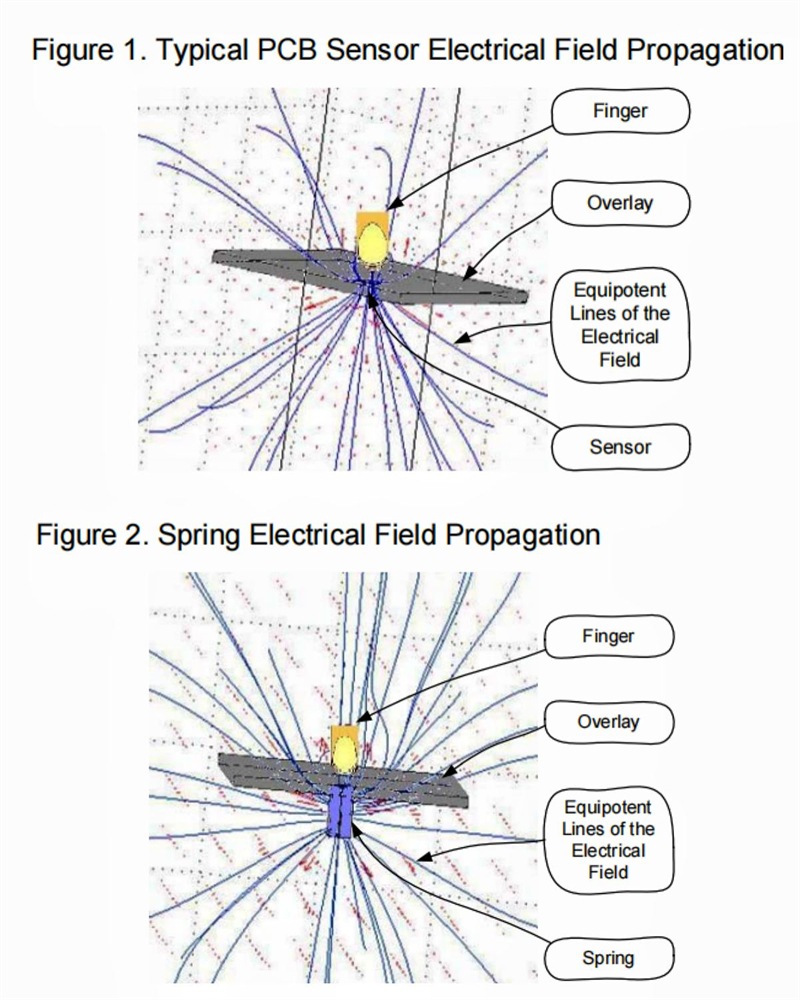
A profound knowledge of mathematics or numerical analysis is not required to access these features. Using the built-in physics modes, one can develop models by defining the relevant physical quantities, such as material properties (for example, geometric dimensions, object conductivity, dielectric constants, and so on) and sources, instead of defining the underlying equations. Comsol Multiphysics then internally compiles a set of PDEs representing the entire model. Figure 1 and Figure 2 show the electrical field from a solid conductive sensor and a spring sensor simulation.
The solid conductive sensor and spring sensor modeling is done in the following conditions:
• The overlay is mineral glass (relative permittivity ε = 4.2; thickness = 4 mm.)
• Finger is modeled as a metal ellipsoid (height = 20 mm; diameter = 10 mm).
• Solid conductive sensor is a solid metal circle (diameter = 10 mm; thickness = 0.1 mm).
• The spring sensor is modeled with a hollow metal cylinder (height = 20 mm; diameter = 10 mm; metal thickness = 1 mm).
Figure 1 on page 1 shows that propagation from the solid conductive sensor to the finger emanates from the upper surface of the sensor.
Figure 2 on page 1 shows that propagation from the spring (cylinder) to the finger emanates from the upper surface of the sensor, and also from the side surface. This suggests that the sensitivity of the spring is a little better than that of the solid conductive sensor with thick overlays, because a larger electric field is formed. This assumption is verified with touch capacitance calculation, described in the following section.
The simulation technique discussed in AN42851 “Proximity Detection in the Presence of Metal Objects” is used in this case.
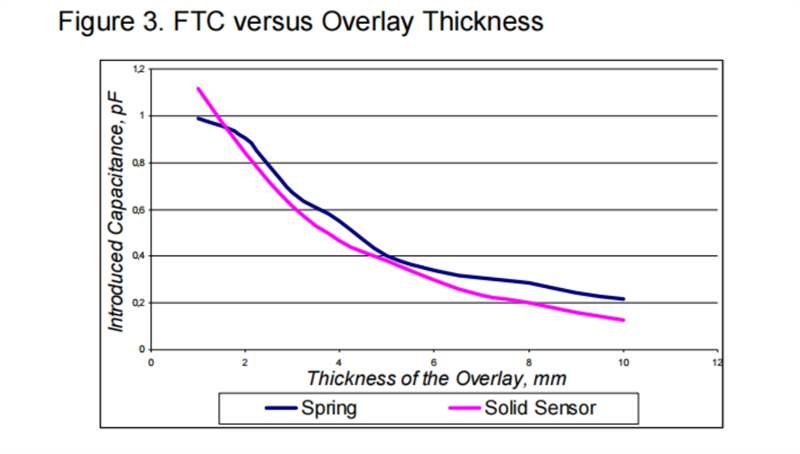
To define the influence of the overlay thickness on the Finger Touch added Capacitance (FTC), modeling on a solid conductive sensor and a spring sensor is done in the same conditions described in the section Spring Electrical Field Simulation on page 1. This is shown in Figure 3. The only feature changed is the overlay thickness (from 1 mm to 10 mm).
In addition, to define the most optimal spring physical dimensions, the dependence of the FTC is modeled on its parameters such as its height, its diameter, and the thickness of the wire in the spring.
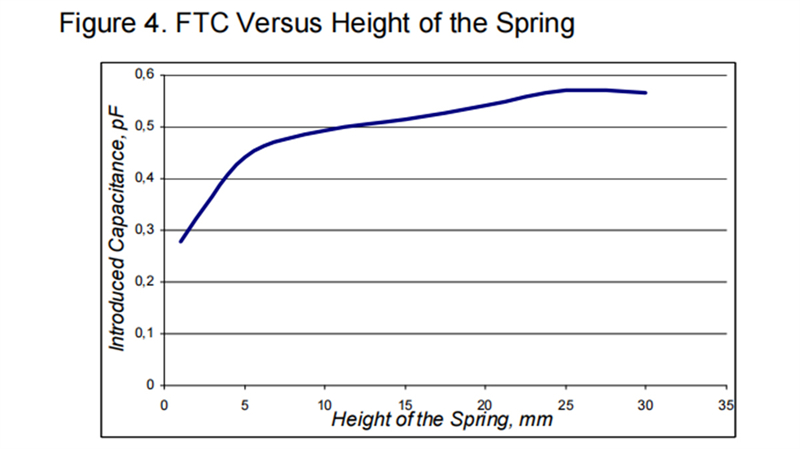
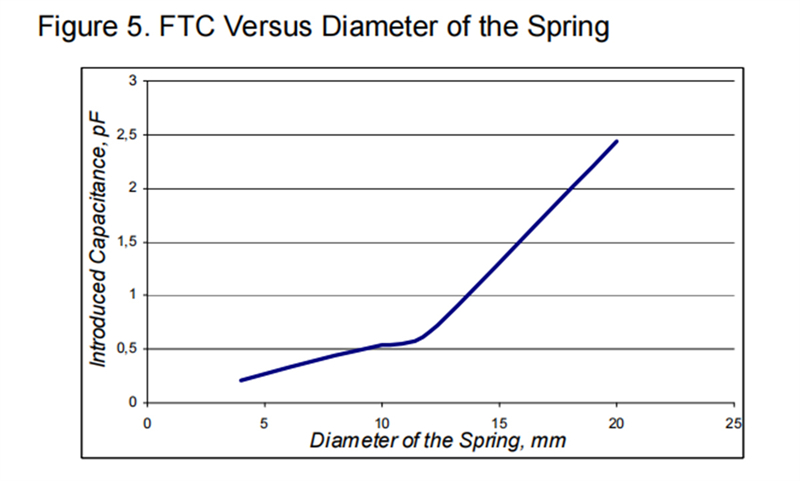
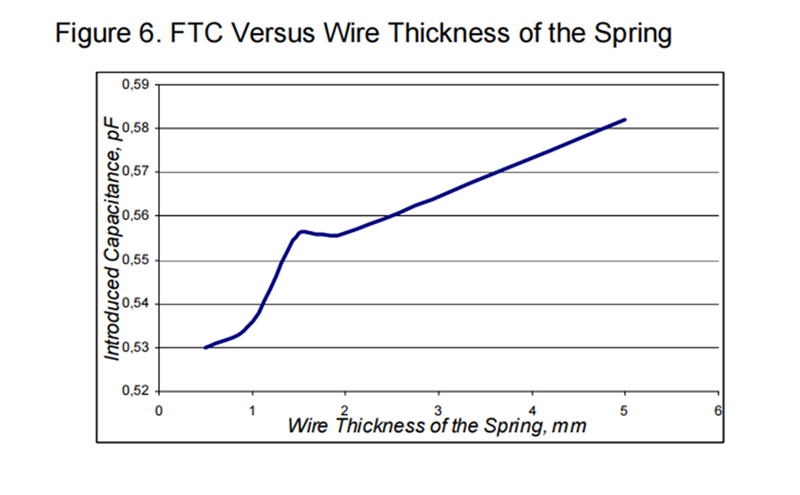
The dependence of FTC against different simulation parameters is shown in Figure 4 to Figure 6.
From Figure 1 and Figure 2 on page 1, it is evident that a spring and a solid conductive sensor have the same sensitivity when a finger is placed above the sensor. When a finger is placed beside the sensor center, the sensitivity of both sensor types is less. However, the spring sensitivity is comparatively better.
The greater signal from finger displacement of spring sensors is considered an advantage, especially when used in sliders. The section Sliders from Springs on page 4 explains this in more detail.
Figure 3 on page 2 shows that if the overlay thickness is 2 mm or more, the spring sensitivity is higher.
Figure 4 to Figure 6 on page 2 show which spring physical dimensions are better suited to receive the optimal capacitance features.
Use springs with a height 5 mm or more. Springs with more height do not result in additional sensitivity, but do not worsen the performance either. Therefore, more distance between the board and overlay may be provided when required. Springs with heights less than 5 mm lose properties such as elasticity, sensitivity, and side sensitivity.
To reach the optimal spring sensitivity, the diameter of the spring must be not less than 10 mm for a 4 mm overlay (see Figure 5 on page 2). In some cases one can use springs with a smaller diameter if their sensitivity through the chosen overlay is sufficient.
Figure 6 on page 2 shows that the thickness of the spring wire does not greatly influence its capacitance characteristics. The FTC changes in the range of hundredths of picofarads. Therefore, the wire thickness must be chosen according to the required strength of the spring elasticity. On the whole, the wire thickness can range from 0.3 mm to 1.5 mm.
Judging by the intermediate results of the simulation, in general the self capacitance of the spring is more than that of a solid conductive sensor with the same diameter. This is compensated by using a shield electrode when the CSD method is used.
Touch springs of different shapes may be used in practical applications. Each shape has its advantages and disadvantages. Figure 7 to Figure 9 show some of the common shapes.
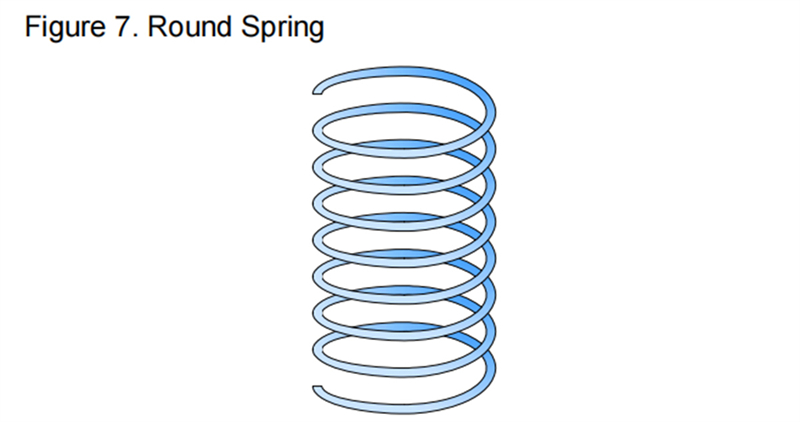
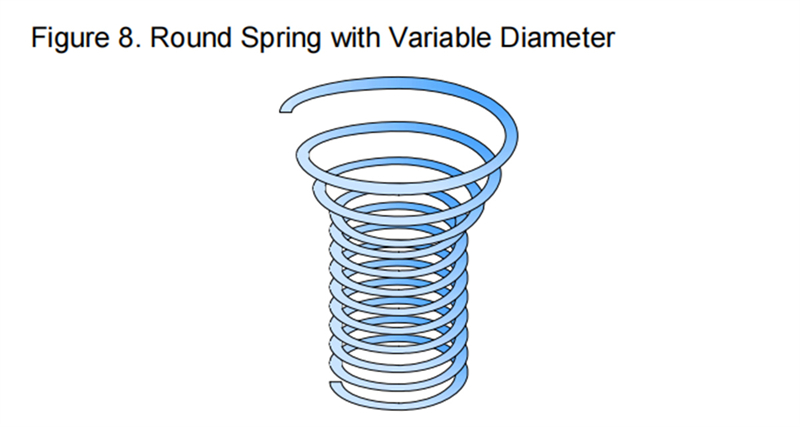
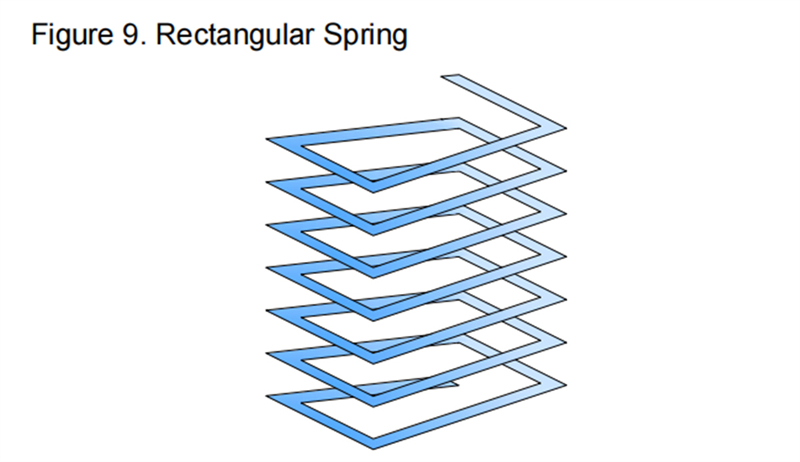
Figure 7 shows a round spring for a standard button. It is easily made and has a hollow space inside for backlight or other requirements.
Figure 8 shows a round spring with higher sensitivity. When the overlay contacts and compresses the spring, the wider part folds in forming a solid sensor, which increases its sensitivity and allows the use of thicker overlays.
It is better to use rectangular springs to form a slider (see Figure 9). When several rectangular springs are placed in a row, they cover the slider sensing area more effectively. Also, the rectangular spring width is shorter than that of a round one, which allows creating a slider with more sensors.
A spring has high side sensitivity, as mentioned in the previous sections. This sensitivity may be used in a slider.
When the overlay is thick and interpolation is used, a slider made of springs has better linearity than a solid conductive slider with the same segment count and overlay thickness.
(Figure references appearing on this page)
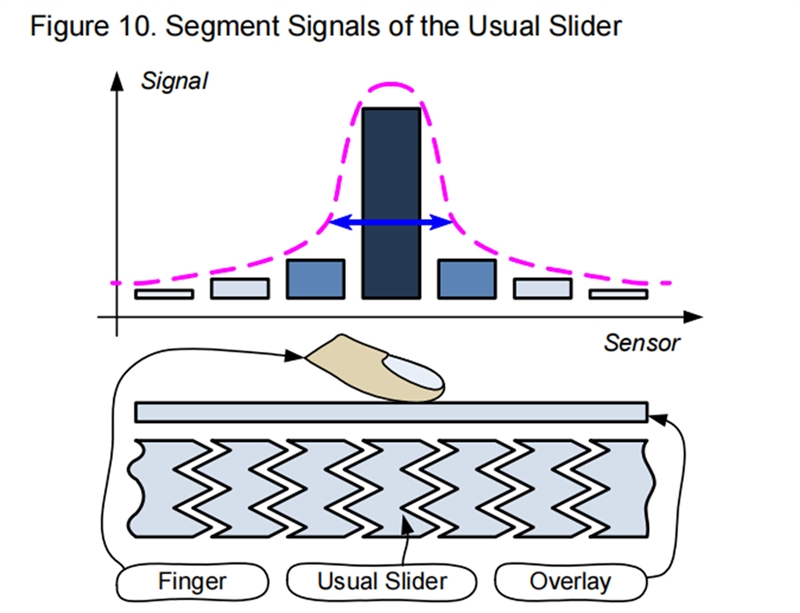
Sliders made from springs have greater segment signal distribution variation due to greater overlapping between the electrical fields of adjacent segments. Better field distribution between segments results in better linearity in touch position calculation when using the centroid algorithm in CapSense UMs.
Figure 12 shows the interpolation linearity graph of a usual slider and a slider with springs, for the same overlay thickness. As shown in the graph, the spring slider provides better linearity.
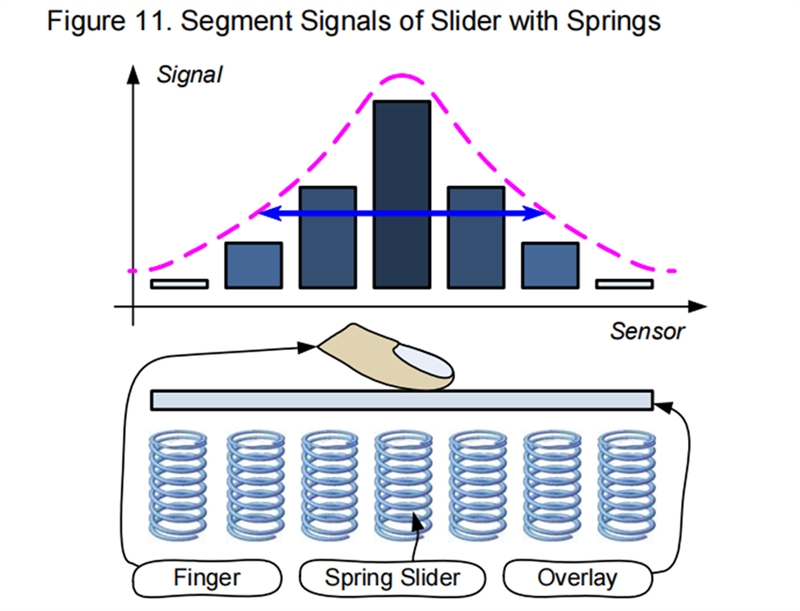
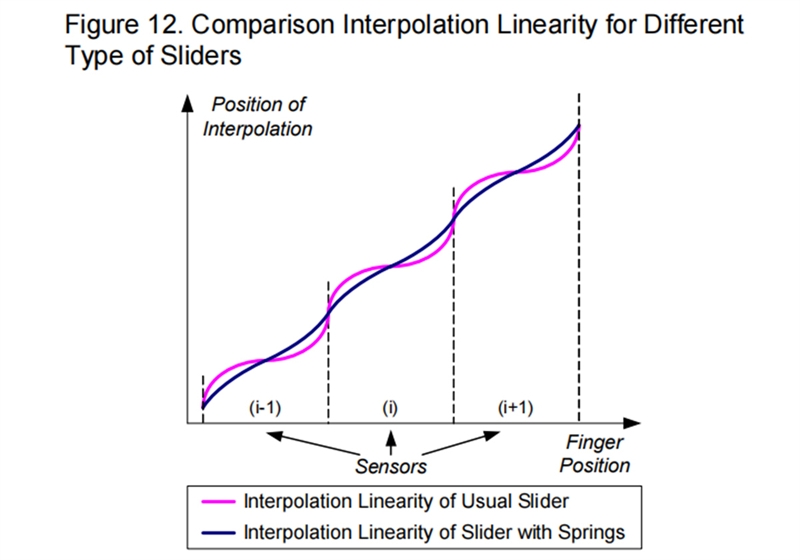
Figure 13 shows an example of spring mounting. This section discusses how to design spring sensors.
Because springs have higher side sensitivity, the neighboring spring sensors must be placed as far as possible from each other to prevent false detections. Add a comparison level if the sensor pitch is small.
The requirements for the sensitive area of a spring are the same as the requirements for solid buttons. When using thick overlays, the spring diameter must be larger than the overlay thickness by at least 2 or 3 times.
The distance between the PCB and the overlay must be 5 mm or more.
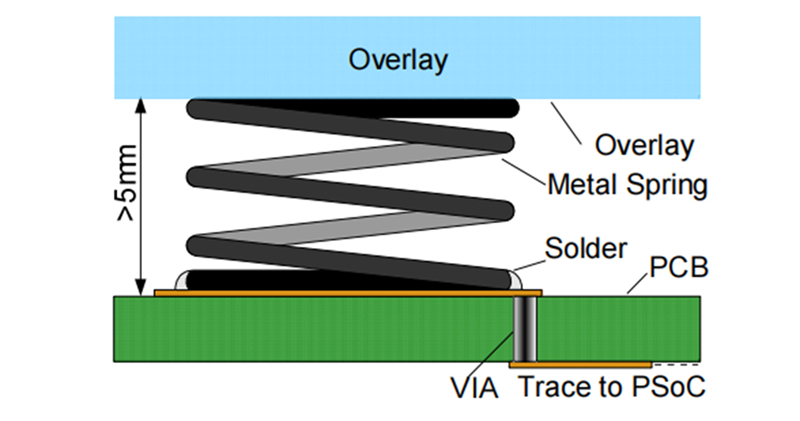
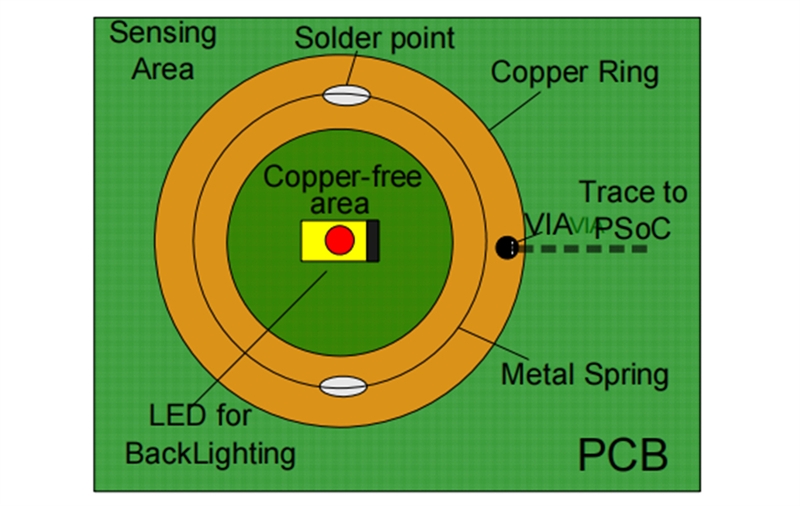
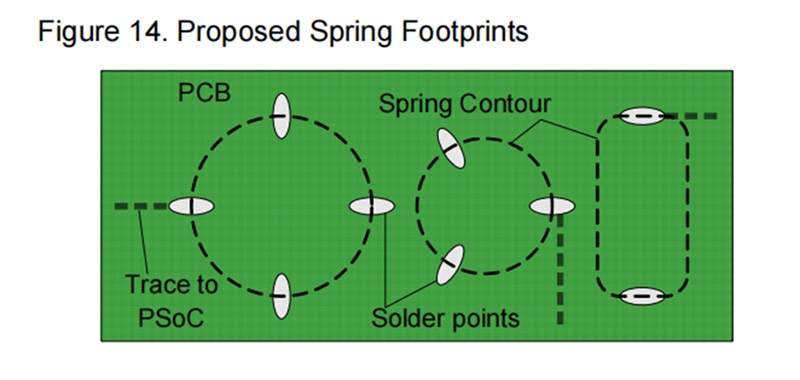
Figure 14 shows examples of footprints for springs. Do not place solid grounds under the springs. This complicates the spring soldering and increases the native capacitance of the sensors.
Sensors usually need backlighting. Using springs as sensors makes it possible to insert an LED inside for uniform front panel illumination. Therefore, two types of backlighting may be created.
One, an LED installed on the upper side of the board provides dispersed backlighting.
Two, an LED installed on the lower side of the board directs its light through the opening upwards, and provides narrow spot lighting.
A wide dispersion is optimal for backlighting front panel pictograms, while narrow is better for indicating status.
Bicolor LEDs are a good choice for many applications, for both backlight and button status indication.
The hollow space inside a spring can also be used as a mechanical button (see Figure 15).
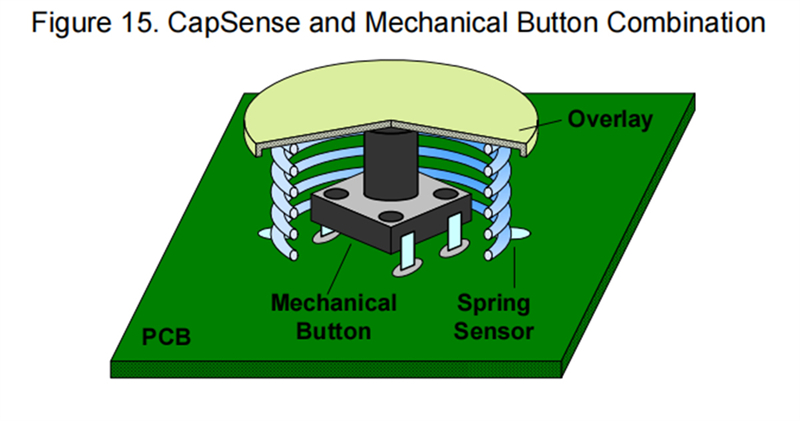
Touching such a button only triggers the sensor, while pressing the button activates both the sensor and mechanical button.In this case, preparatory actions such as backlighting, prompt showing, and others are possible only if the sensor works.The final action is performed when both buttons work.For example, in a GPS navigation system, touching a button shows only a hint and pressing the button takes an action.
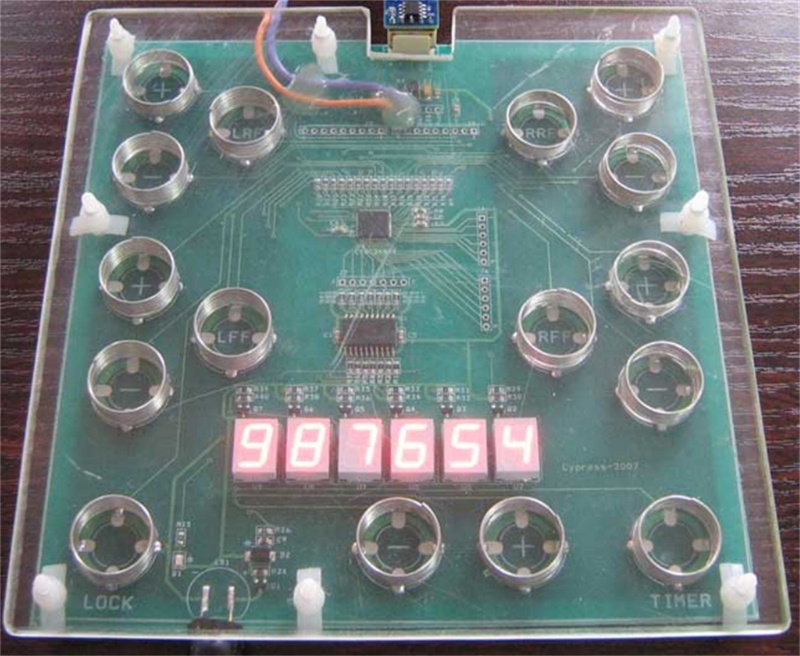
Figure 16 and Figure 17 show project demonstrator examples for white Good applications.
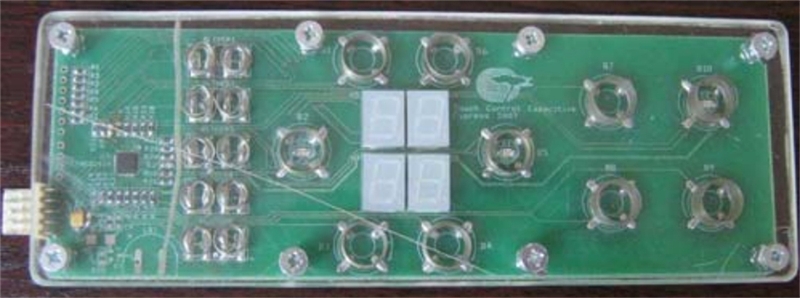
Springs are used as an alternative to solid conductive sensors in the air gap between the board and overlay. The sensitivity of springs is not less than that of standard sensors the when overlay thickness is at least several millimeters.
However, using springs has the following advantages:
• Provides an air gap between a PCB and an overlay.
• Enables the placement of buttons at different distances from the board. This makes it easy to work with curved overlays.
• Due to their elastic properties, springs provide reliable sensor function during conditions such as vibration or changing the distance from the overlay to the board (for example, a washing machine).
• Ideal for thick overlays.
• Provides better slider linearity than a solid conductive slider for same segment count and interpolation ratio.
• Can easily create sensor front panel back-lighting.
• Allows using Cap-sense in combination with mechanical buttons to improve the user interface.
 Goodkey Machinery Import & Export Co., Limited



Leave A Message
Scan to Wechat/Whatsapp :