- Tel: +86 15759270795
- Email: Sales@touchkey-china.com



Core specialist at Goodkey Machinery with 25+ years in touch springs. Translating complex precision engineering into sharp, expert insights. Mastering the art of the coil and crimping technology.
In the sophisticated world of HMI design, the dielectric constant (εᵣ) is far more than just a physical property; it is the heartbeat of capacitive touch sensitivity. Understanding how different materials—from standard soda-lime glass to advanced optical adhesives—influence electric field coupling is essential for engineers aiming to balance sleek aesthetics with industrial-grade reliability. As a professional manufacturer, Goodkey Machinery Company provides this technical deep-dive to help you optimize your touch panel stack-up for maximum signal integrity.
In a capacitive touch panel, your finger (a conductive object) changes the local capacitance of a sensor pattern (usually ITO electrodes). The system detects this change to determine touch location. The dielectric constant of the materials between the finger and the sensor directly influences:
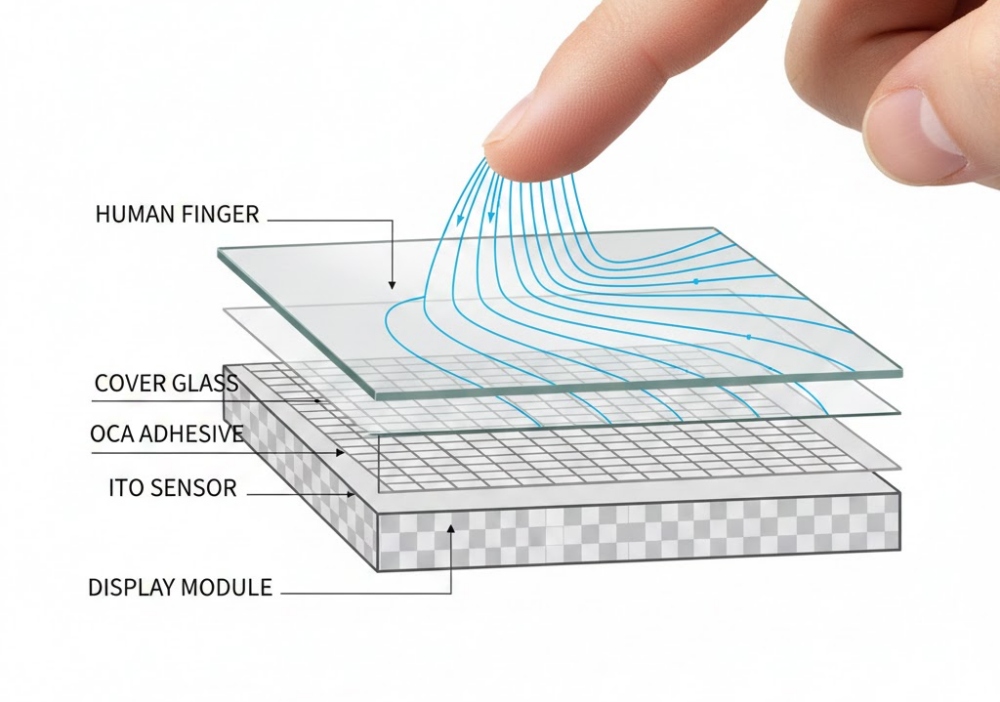
The following table lists common materials and their typical dielectric constant (εᵣ) at 1 MHz, which is within the operating frequency range of most touch controllers.
|
Material Layer |
Common Use |
Dielectric Constant (εᵣ) @ ~1 MHz |
Notes |
|
Air / Vacuum |
Reference, air gaps |
1 |
Air gaps in non-bonded designs cause issues (see below). |
|
Cover Lens (Glass) |
Outer protective layer |
6.5 - 8.0 |
Soda-Lime Glass: εᵣ ~7.0 |
|
Chemically Strengthened (Alkali-Aluminosilicate): εᵣ ~6.8 |
|||
|
High εᵣ is beneficial for signal coupling. |
|||
|
Cover Lens (Plastic - PC/PMMA) |
Lower-cost, lightweight panels |
2.8 - 3.2 |
Polycarbonate (PC): εᵣ ~2.9-3.0 |
|
PMMA (Acrylic): εᵣ ~2.8. Lower εᵣ than glass requires design adjustments. |
|||
|
Optical Clear Adhesive (OCA / LOCA) |
Bonds cover lens to sensor |
2.6 - 3.2 |
Acrylic-based OCA: εᵣ ~2.7-3.0. Critical for eliminating the low-εᵣ air gap. |
|
Sensor Substrate (Glass) |
Carries ITO pattern |
6.5 - 8.0 |
Same as cover glass. In some designs (GG), the cover and sensor glass are the same. |
|
Wood |
Outer protective layer |
2-8 |
Dry Wood: εᵣ ~2-5. |
|
Wood at 12% MC: εᵣ ~4-8. |
|||
|
Wet Wood:Unsuitable for touch applications. |
|||
|
Sensor Substrate (PET Film) |
Flexible, thinner panels |
3.0 - 3.4 |
PET (Polyethylene Terephthalate): εᵣ ~3.2. Common in film-based (GFF, GF2) touch panels. |
|
ITO (Indium Tin Oxide) |
Transparent conductive layer |
~3.5 - 4.0 (at DC/low freq) |
Its conductivity (resistivity) is more critical than its εᵣ in this context. |
|
Polarizer |
On top of display |
~3.5 - 4.5 |
Often laminated below the sensor in On-Cell designs. Contains iodine or dye with moderate εᵣ. |
|
Display Module (LCD) |
Under the touch panel |
Complex, anisotropic |
A composite of glass, liquid crystal (εᵣ∥ ~10-20, εᵣ⊥ ~3-5), color filters, etc. Its effective εᵣ is accounted for in system noise modeling. |
|
Water |
Contaminant, rain, sweat |
~80 (at low freq) |
Massively high εᵣ. Causes significant false touches or touch spreading. Water rejection algorithms are crucial. |
|
Glove Material (Cotton/Leather) |
Touch medium |
1.5 - 3.0 (dry) |
Low εᵣ and non-conductive. Standard touch panels cannot detect them. High-sensitivity modes boost drive current to sense the weak coupling through this low-εᵣ barrier. |
While the raw dielectric values of individual layers provide a baseline, the true challenge lies in how these materials interact within a complete assembly. Strategic material selection and bonding techniques are what separate a high-performance interface from one plagued by ghost touches or poor responsiveness. In the following section, we will translate these technical constants into actionable design rules for your next project.
An air gap (εᵣ ≈ 1) between the cover lens and sensor is disastrous for capacitive touch. It severely weakens the electric field, killing sensitivity and creating a parallax effect.
Solution: Use Optical Clear Adhesive (OCA, εᵣ ~2.7) or Liquid OCA (LOCA) to laminate the layers. This increases the effective dielectric constant of the stack, improving signal strength and optical clarity (optical bonding).
Water droplets have an extremely high εᵣ (~80). To the touch sensor, a water drop looks like a super-strong touch, causing "ghost touches" or "touch spreading." Modern touch controllers use sophisticated water rejection algorithms that differentiate the unique shape and signal profile of water from a finger.
Standard gloves act as a low-εᵣ insulator. To detect a gloved finger, the system must either:
Increase the drive signal (Tx) to push the field through the barrier.
Increase the receiver gain (Rx) to amplify the weaker signal.
Use a "glove mode" that does both, often at the cost of higher power consumption and increased susceptibility to noise.
For quick estimation, the layers between the finger and sensor can be thought of as capacitors in series. The inverse of the total capacitance is the sum of the inverses of each layer's capacitance.
A simplified formula for the key stack-up capacitance is:
1/C_total ≈ 1/C_cover + 1/C_oca + 1/C_sensor_substrate
Where C_layer ∝ εᵣ_layer / thickness_layer
The layer with the smallest (εᵣ / thickness) ratio becomes the limiting factor. Usually, this is the cover lens. Therefore, selecting a cover material with a sufficiently high εᵣ for the desired thickness is the first step in a robust capacitive touch design.
|
Design Goal |
Material & Dielectric Constant Strategy |
|
Maximize Sensitivity / Support Thick Covers |
Use high-εᵣ cover glass (εᵣ ~7.0) and ensure full optical bonding (no air gaps). |
|
Lightweight / Flexible Design |
Accept the lower εᵣ of PET films (~3.2) and compensate with thinner designs, more sensitive sensors (e.g., metal mesh), or advanced controllers. |
|
Water Resistance |
Rely on controller water rejection algorithms (software/firmware). Material εᵣ choice does not prevent water issues. |
|
Glove Touch Support |
Select a touch controller IC that features a dedicated high-sensitivity glove mode capable of driving and sensing through low-εᵣ barriers. |
|
Optical Clarity |
Use optical bonding (OCA). This simultaneously improves optical performance (by removing air gaps) and electrical performance (by replacing low-εᵣ air with higher-εᵣ adhesive). |
A modern capacitive touch panel (like on your phone, tablet, or an industrial kiosk) is a complex layered structure. It doesn't have a single "dielectric constant" but rather an effective dielectric constant determined by its stack-up:
Usually made of glass (εᵣ ≈ 5 to 7) or sometimes hard-coated plastic like PMMA (εᵣ ≈ 2.5 to 3.5). This is the dielectric the user's finger directly interacts with.
Beneath the cover glass is an electrode with conductive properties(Capacitive touch button, Indium Tin Oxide, etc.).
For the purpose of touch sensitivity (the capacitance change a finger causes), electrical engineers use an effective dielectric constant for the entire stack, typically in the range of εᵣ ≈ 4 to 6. This is the value relevant for the touch sensor's operation.
The touch panel is designed to work in air (εᵣ ≈ 1), and its sensitivity is calibrated for that. Introducing a different material behind or in front of it changes the parasitic capacitance and can affect performance.
While the dielectric constant is a fundamental property, in capacitive touch, it is the system-level integration of materials (εᵣ, thickness) and controller intelligence that determines ultimate performance. Always consult with your touch sensor manufacturer or controller IC vendor to model and simulate your specific stack-up.
Ultimately, achieving a robust capacitive touch interface is a delicate exercise in system-level integration. While selecting materials with high dielectric constants can significantly boost signal strength, it is the synergy between the cover lens, bonding layers, and the touch controller's intelligence that defines the user experience. By modeling your specific stack-up early in the design phase, you can ensure your product remains sensitive and reliable across all environments. At Goodkey, we are committed to supporting your engineering journey with high-precision components and expert technical consultation.
 Goodkey Machinery Import & Export Co., Limited



Leave A Message
Scan to Wechat/Whatsapp :